# Baked Animation Sequences

***

### Import OBJ Sequences:&#x20;

1. In the Element Scene Setup, go to File/Import 3D Sequence
2. Select the first file in your animation sequence
3. Click Import

<div><figure><img src="https://2307539615-files.gitbook.io/~/files/v0/b/gitbook-x-prod.appspot.com/o/spaces%2FVXPIT6wWK7VeTYMAHNYe%2Fuploads%2FTOQYsklZQ4IHVh676lET%2FBaked-animation-import.jpg?alt=media&#x26;token=ca9a5263-ff7a-460e-a991-f9f3629c164b" alt=""><figcaption></figcaption></figure> <figure><img src="https://2307539615-files.gitbook.io/~/files/v0/b/gitbook-x-prod.appspot.com/o/spaces%2FVXPIT6wWK7VeTYMAHNYe%2Fuploads%2Fd9i1TR9SFyjIC685N0jo%2FBaked-animation-import-02.jpg?alt=media&#x26;token=64e42199-4bc5-4002-9e1c-79fe0b71976b" alt=""><figcaption></figcaption></figure></div>

### Baked Animation

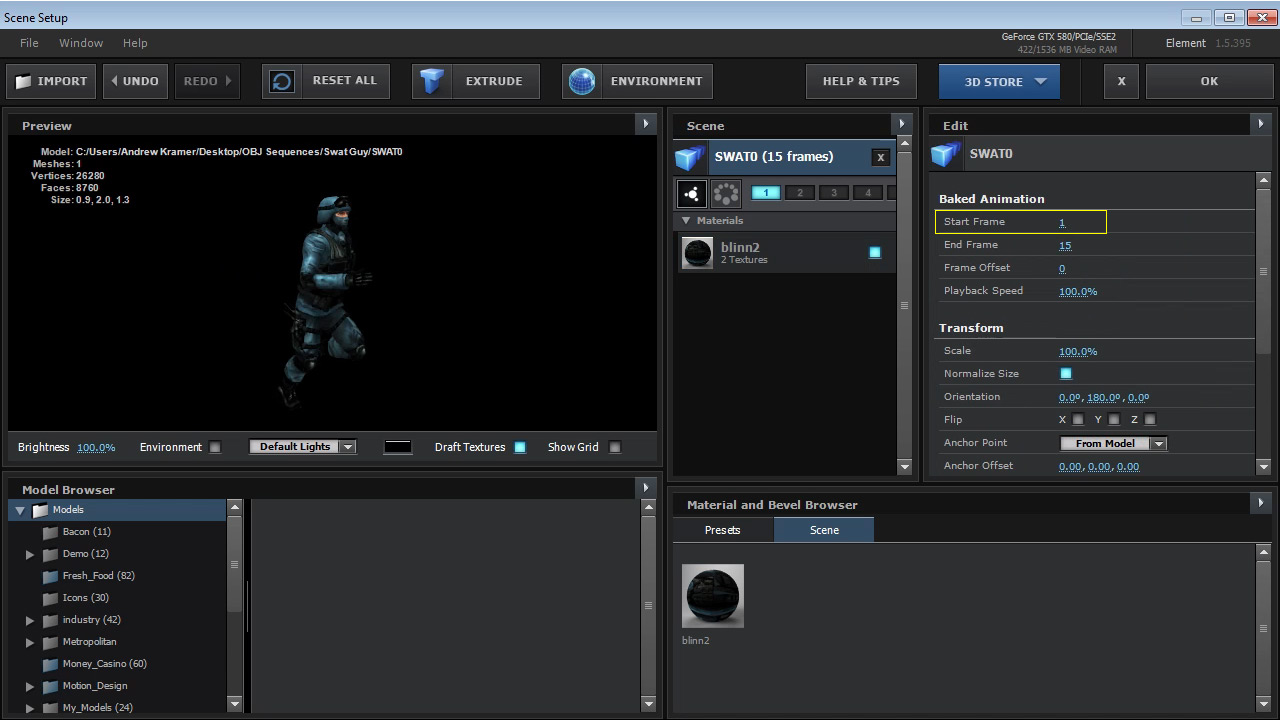
Once imported, under the model options you&#x20;will get some options for Start Frame, End Frame,&#x20;Frame Offset, and Playback Speed.

<figure><img src="https://2307539615-files.gitbook.io/~/files/v0/b/gitbook-x-prod.appspot.com/o/spaces%2FVXPIT6wWK7VeTYMAHNYe%2Fuploads%2FehdirYLD1tpV45PJGt1c%2FBaked-animation-model-options.jpg?alt=media&#x26;token=8c80f5f4-6265-471a-8d15-18d8643aa949" alt=""><figcaption></figcaption></figure>

### Start Frame

<figure><img src="https://2307539615-files.gitbook.io/~/files/v0/b/gitbook-x-prod.appspot.com/o/spaces%2FVXPIT6wWK7VeTYMAHNYe%2Fuploads%2Fl4MLhn5nqikxPrljdCcd%2Fbaked-animation-start-frame.jpg?alt=media&#x26;token=e0f60c0e-8c28-41e1-b63f-0953cb1f5655" alt=""><figcaption></figcaption></figure>

Once you hit Ok and go to After Effects, you will have some additional options under under Particle look.

<figure><img src="https://2307539615-files.gitbook.io/~/files/v0/b/gitbook-x-prod.appspot.com/o/spaces%2FVXPIT6wWK7VeTYMAHNYe%2Fuploads%2FHGdNNpR0eAFrXEuatEPx%2FBaked-animation-options.jpg?alt=media&#x26;token=fdfce264-3211-4f93-a145-cc2561851af8" alt=""><figcaption></figcaption></figure>

***

**Element v1.5 New Features Video**\
• Animated OBJ Sequences Support\
• Built-In Glow Rendering\
• Custom Anchor Point Control\
• [View More Features](https://www.videocopilot.net/help/element/help_files_v2/updates/element_3d_v1_5/)

<table data-view="cards"><thead><tr><th data-hidden data-card-cover data-type="image">Cover image</th></tr></thead><tbody><tr><td><a href="https://2307539615-files.gitbook.io/~/files/v0/b/gitbook-x-prod.appspot.com/o/spaces%2FVXPIT6wWK7VeTYMAHNYe%2Fuploads%2FAkyOiviW3DJp3935DIWm%2Fupdate.jpg?alt=media&#x26;token=d7f5f20a-4a2c-4bdc-9779-610f2e047b97">update.jpg</a></td></tr></tbody></table>