# Tessellation Options

***

<figure><img src="https://2307539615-files.gitbook.io/~/files/v0/b/gitbook-x-prod.appspot.com/o/spaces%2FVXPIT6wWK7VeTYMAHNYe%2Fuploads%2F9zmlD2dwdwCFHmp2MkMj%2FTesselation-Options-Example.jpg?alt=media&#x26;token=b4c4decf-91ce-4b98-a933-0ac5cbcd735a" alt=""><figcaption></figcaption></figure>

***

<div align="left"><figure><img src="https://2307539615-files.gitbook.io/~/files/v0/b/gitbook-x-prod.appspot.com/o/spaces%2FVXPIT6wWK7VeTYMAHNYe%2Fuploads%2FjFfngAolNkTwkQeTRjPl%2FTesselation-Options-Example-thumb-02.jpg?alt=media&#x26;token=11454f5c-6851-43a7-82ea-b9605c670c3d" alt=""><figcaption></figcaption></figure></div>

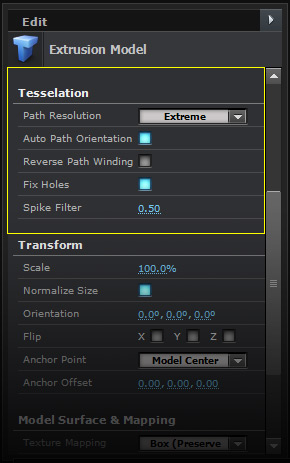
**Path Resolution**\
Adjust the quality of the extrusion. Low will have less geometry, where Extreme will have dense geometry.\
\
**Auto Path Orientation**\
Auto orientates your paths if your windings are inverted.\
\
**Reverse Path Winding**\
Reverses the winding of your path from counter clockwise to clockwise.\
\
**Fix Holes**\
Fixes holes in your geometry caused by reversed paths. \
\
**Spike Filter**\
Fixes spikes in your paths by removing vertices.

{% hint style="info" %}

#### PATH RESOLUTION

Set the Path Resolution to normal when working on your extrustions to speed up your workflow
{% endhint %}