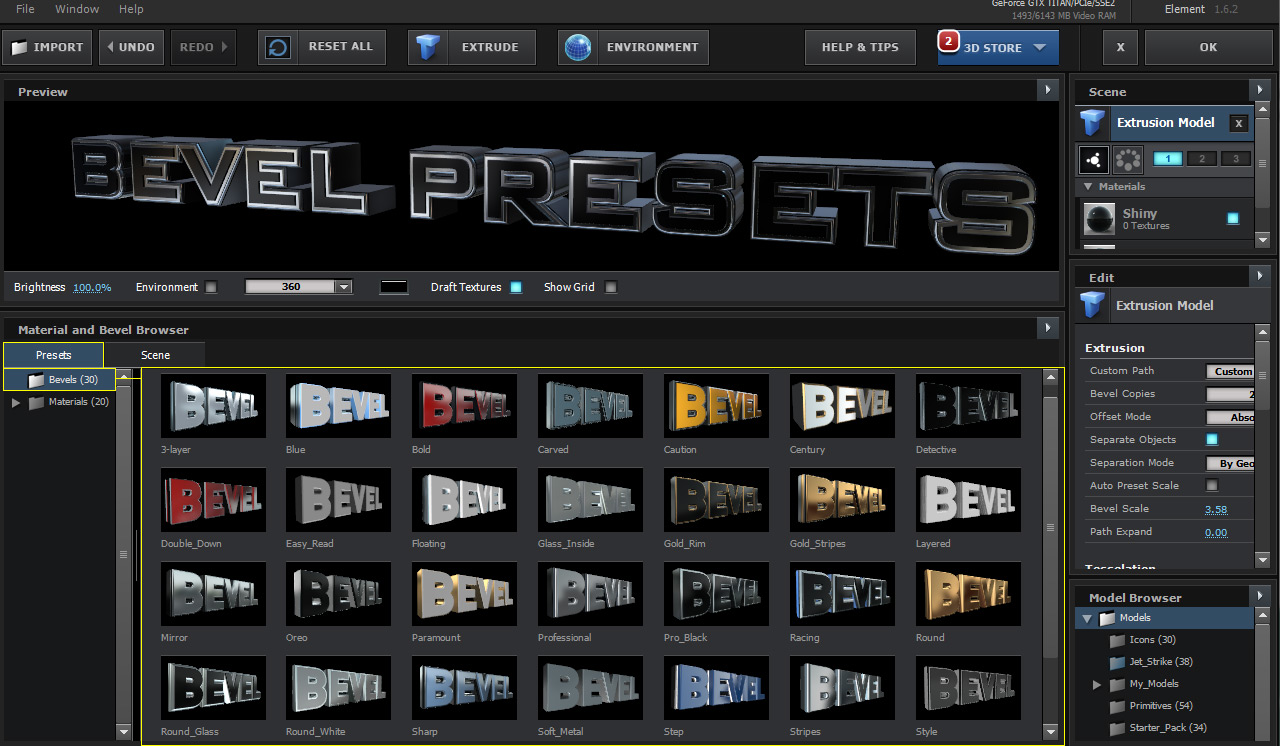
# Bevel Presets

***

In the Material and Bevel Browser there is a preset tab that has a folder with 30 Bevel Presets. Drag a preset to an extrusion model to apply it. You can also right click to add to an extusion. Save a Bevel Preset by right clicking on the extrusion model and it will save your extrusions and materials settings.

<figure><img src="https://2307539615-files.gitbook.io/~/files/v0/b/gitbook-x-prod.appspot.com/o/spaces%2FVXPIT6wWK7VeTYMAHNYe%2Fuploads%2FRtgAsP73e8cFVcv043wj%2FBevel-Presets.jpg?alt=media&#x26;token=cbb03de8-0046-468e-855d-48a89d168c2d" alt=""><figcaption></figcaption></figure>

***

<table data-view="cards"><thead><tr><th data-hidden data-card-cover data-type="image">Cover image</th></tr></thead><tbody><tr><td><a href="https://2307539615-files.gitbook.io/~/files/v0/b/gitbook-x-prod.appspot.com/o/spaces%2FVXPIT6wWK7VeTYMAHNYe%2Fuploads%2F1KOfAFPukdPLt6497ZOY%2Fextrude_3d_text.jpg?alt=media&#x26;token=88f07caa-f6c7-4ed0-91a6-3a86eeb31c9a">extrude_3d_text.jpg</a></td></tr></tbody></table>

**Advanced 3D Text and Bevels**\
• Create 3D Text using Element\
• Rotate and Animate text and letters\
• Learn how to use Element to Extrude 3D Text\
\
[**WATCH NOW!**](https://www.videocopilot.net/help/element/tutorial/basic/extrude_3d_text/)

***

{% hint style="info" %}

#### EXPORTING EXTRUDED PATHS TO OBJ (HIDDEN FEATURE)

In the Scene Setup select your extrusion model, hold Shift and click on File at the top left and you will see an option called Export as Obj. This will save an obj file of your extrusion model.

![](https://2307539615-files.gitbook.io/~/files/v0/b/gitbook-x-prod.appspot.com/o/spaces%2FVXPIT6wWK7VeTYMAHNYe%2Fuploads%2FmlYC8JJ81AL2wVu0HGf8%2FExporting-Extreded-Thumb.jpg?alt=media\&token=73835f13-3877-427b-9ced-9c2cbc93081c)
{% endhint %}