# Particle Replicator

***

The Particle Replicator allows you to replicate particles into the shape of a pre-defined object structure. The entire replicator array can also be moved around using the position controls. There are also controls for the size of the array shape, but keep in mind these are separate from the actual Particle properties.

<figure><img src="https://2307539615-files.gitbook.io/~/files/v0/b/gitbook-x-prod.appspot.com/o/spaces%2FVXPIT6wWK7VeTYMAHNYe%2Fuploads%2FvWrQUrCVyYW2RRUIxVp4%2FParticle-replicator02.jpg?alt=media&#x26;token=537d7c34-734d-48fa-8e1e-f4e44d945ed4" alt=""><figcaption></figcaption></figure>

{% hint style="info" %}
If multiple 3D objects are set to the same group inside the Scene Setup, these objects will be replicated randomly in your array.
{% endhint %}

<figure><img src="https://2307539615-files.gitbook.io/~/files/v0/b/gitbook-x-prod.appspot.com/o/spaces%2FVXPIT6wWK7VeTYMAHNYe%2Fuploads%2F608QqGPCD9Dfvg2EdDVc%2FParticle_Rep.jpg?alt=media&#x26;token=3f018767-2a6c-4627-ad8d-37dd69023fa7" alt=""><figcaption></figcaption></figure>

***

**3D Replicator**\
• Using position noise\
• Use 3D object as replicator shape\
• Use Layer alpha as replicator shape\
\
[**WATCH NOW!**](https://www.videocopilot.net/help/element/tutorial/basic/3d_replicator/)

<table data-view="cards"><thead><tr><th data-hidden data-card-cover data-type="image">Cover image</th></tr></thead><tbody><tr><td><a href="https://2307539615-files.gitbook.io/~/files/v0/b/gitbook-x-prod.appspot.com/o/spaces%2FVXPIT6wWK7VeTYMAHNYe%2Fuploads%2FXGvYJRcw0VPdqwj4GwAd%2F3d_replicator.jpg?alt=media&#x26;token=6ecf6b3c-8bda-48b6-b101-43a5839b8e78">3d_replicator.jpg</a></td></tr></tbody></table>

***

### PARAMETERS

Below is a list of parameters and descriptions of their functionality.

***

#### Particle Count

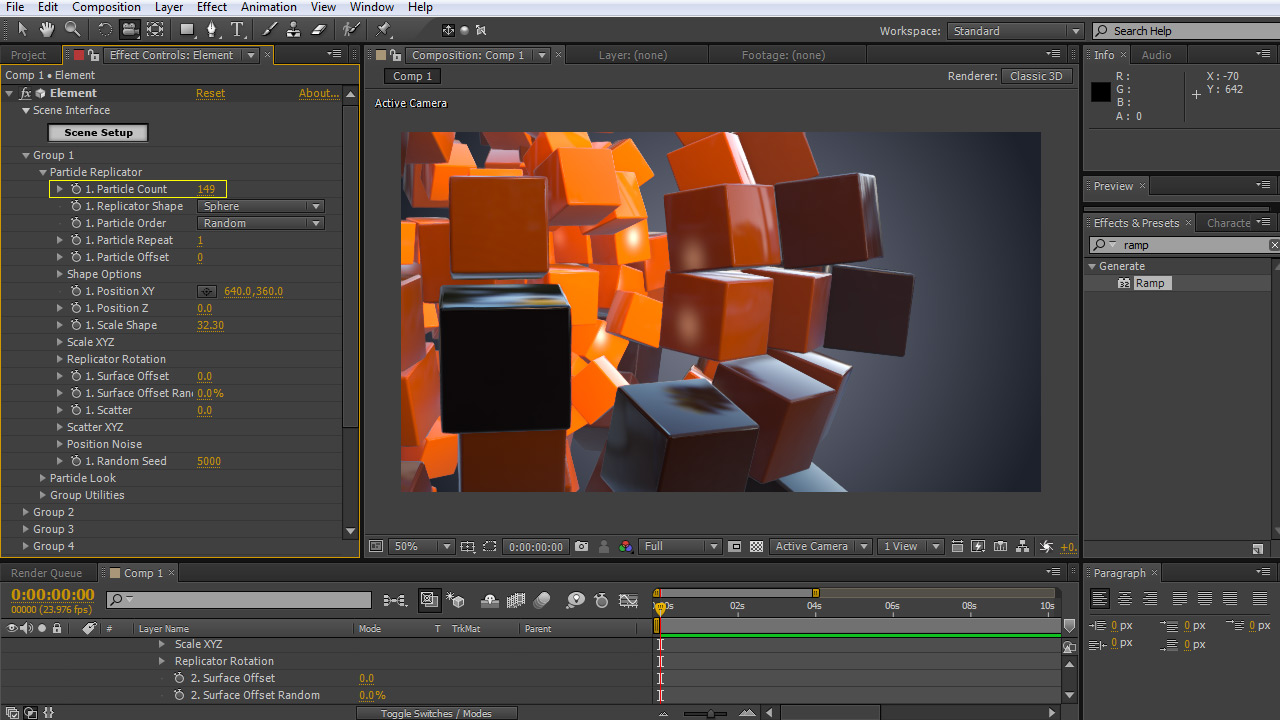
How many objects will be in the Replicator array.

<figure><img src="https://2307539615-files.gitbook.io/~/files/v0/b/gitbook-x-prod.appspot.com/o/spaces%2FVXPIT6wWK7VeTYMAHNYe%2Fuploads%2F64DIEEpDXYXHvldXGAof%2FParticle-Count.jpg?alt=media&#x26;token=4cefc57f-18be-42d3-835e-d8973f805581" alt=""><figcaption></figcaption></figure>

***

#### Replicator Shape

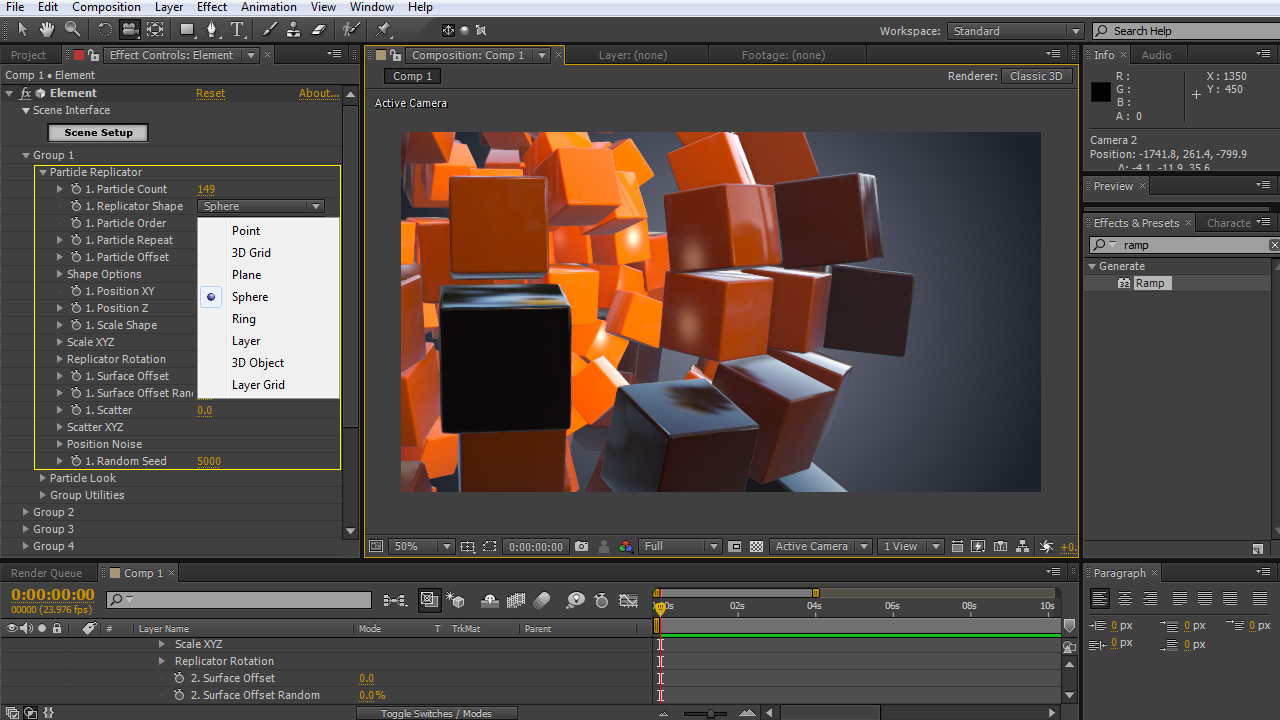
Defines the shape or structure that your particles will be occupying. There are several Replicator shape options, such as Point, 3D Grid, Plane, Sphere. There are also some options for more custom particle shapes, see Custom Replicator Shape below.

<div align="left"><figure><img src="https://2307539615-files.gitbook.io/~/files/v0/b/gitbook-x-prod.appspot.com/o/spaces%2FVXPIT6wWK7VeTYMAHNYe%2Fuploads%2FrQK6mGJRhPhRMWu7rM9r%2FReplicator-Shape-Thumb.jpg?alt=media&#x26;token=0feb8858-1336-44fe-bbab-020885df43fe" alt=""><figcaption></figcaption></figure></div>

#### Custom Replicator Shapes

<figure><img src="https://2307539615-files.gitbook.io/~/files/v0/b/gitbook-x-prod.appspot.com/o/spaces%2FVXPIT6wWK7VeTYMAHNYe%2Fuploads%2Fa0884CU8YYTSBWBp8gTr%2FCustom_Replicator_Shape.jpg?alt=media&#x26;token=0bd02a42-212b-44f3-87cd-1b1d65a716db" alt=""><figcaption></figcaption></figure>

{% hint style="info" %}

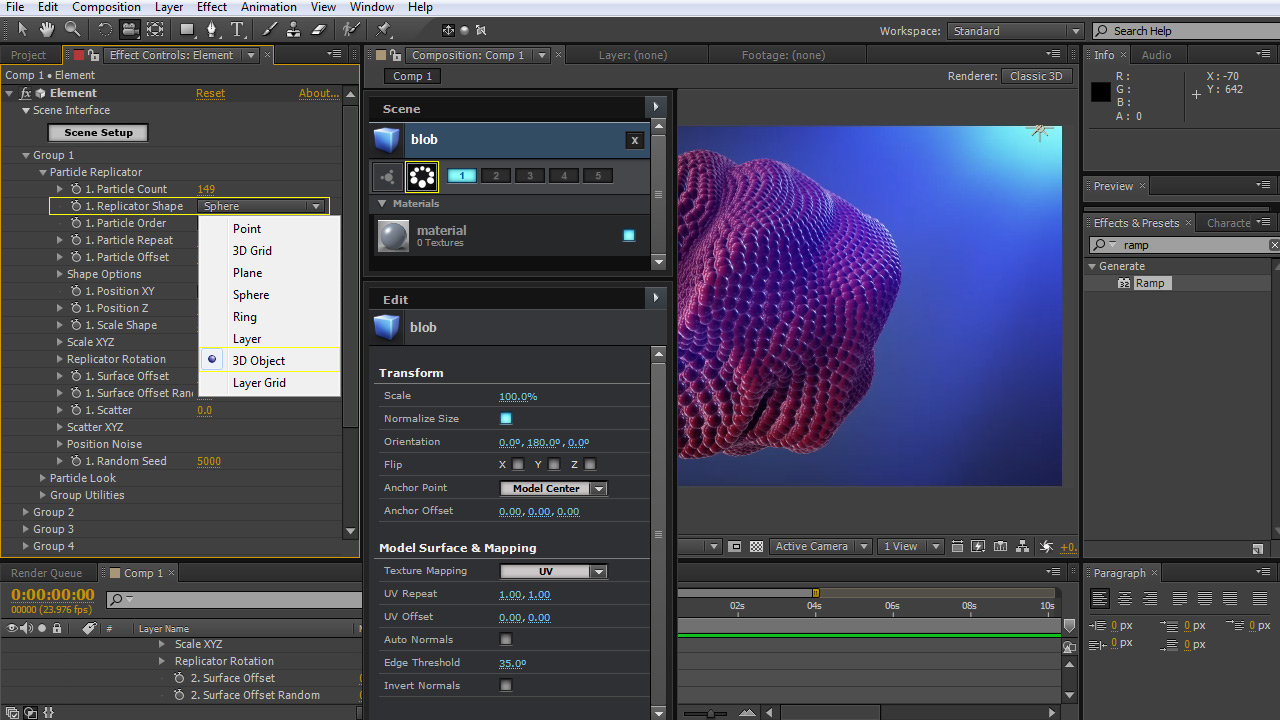
#### Using a 3D Object as a Replicator Shape \&#xNAN;*You can choose a 3D object from the scene interface to use as the array structure to fill in particles.*&#x20;

1. In the Scene Interface choose the object that you want to set as the shape.
2. Set as a replicator shape by clicking the icon that looks like a ring of spheres next to the group numbers.
3. You can also set the group number to define what group you want to have this particle shape.
4. When you hit ok, you can use the Particle Count

#### ![](https://2307539615-files.gitbook.io/~/files/v0/b/gitbook-x-prod.appspot.com/o/spaces%2FVXPIT6wWK7VeTYMAHNYe%2Fuploads%2FdljnhtURwukhuFys9uyN%2FUsing%20a%203D%20Object%20as%20a%20Replicator%20Shape%20Thumb.jpg?alt=media\&token=d0cfdfe5-ce02-4ca6-a03d-8a135ee8369a)  &#x20;

{% endhint %}

#### Layer:&#x20;

Allows you to use a layer shape to define the shape the Replicator the shape of a layer. Use the Custom Layer option under Shape Options to choose the layer to reference.

<div align="left"><figure><img src="https://2307539615-files.gitbook.io/~/files/v0/b/gitbook-x-prod.appspot.com/o/spaces%2FVXPIT6wWK7VeTYMAHNYe%2Fuploads%2Fe1rGGsLXJHLtKy7iZUFo%2FLayer.jpg?alt=media&#x26;token=236b58b6-42f1-4908-a644-62a4069fd163" alt=""><figcaption></figcaption></figure></div>

#### Layer Grid:&#x20;

Uses a layer to define a shape, but spaces the objects into a grid with some options to fill the particles in on the X and Y. Use the Custom Layer option under Shape Options to choose the layer to reference.

<div align="left"><figure><img src="https://2307539615-files.gitbook.io/~/files/v0/b/gitbook-x-prod.appspot.com/o/spaces%2FVXPIT6wWK7VeTYMAHNYe%2Fuploads%2F4RbBUBcqGCmaOxenIwDo%2FLayer-Grid.jpg?alt=media&#x26;token=9610ea51-9d06-4886-aece-e1df254d579d" alt=""><figcaption></figcaption></figure></div>

***

#### Particle Order

Choose how your particles are laid out in a particular replicator shape

<figure><img src="https://2307539615-files.gitbook.io/~/files/v0/b/gitbook-x-prod.appspot.com/o/spaces%2FVXPIT6wWK7VeTYMAHNYe%2Fuploads%2F8L24YJ11wFJg8H9Aezio%2FParticle-Order.jpg?alt=media&#x26;token=cc67971c-937a-4aa6-870e-75bbd0d93ddf" alt=""><figcaption></figcaption></figure>

#### Random:&#x20;

Randomly orders how the particle's positions are laid out

<div align="left"><figure><img src="https://2307539615-files.gitbook.io/~/files/v0/b/gitbook-x-prod.appspot.com/o/spaces%2FVXPIT6wWK7VeTYMAHNYe%2Fuploads%2FRJzmn4EmyIQoIZBIA8H8%2Frandom_thumb.jpg?alt=media&#x26;token=500d356d-9581-490f-96e2-6f55368861db" alt=""><figcaption></figcaption></figure></div>

#### Forward:&#x20;

Loops the particle order sequentially (as relating to the order from top to bottom in the scene interface)

<div align="left"><figure><img src="https://2307539615-files.gitbook.io/~/files/v0/b/gitbook-x-prod.appspot.com/o/spaces%2FVXPIT6wWK7VeTYMAHNYe%2Fuploads%2FNwRhfDJGm5BZtXSoE6vP%2FForward_thumb.jpg?alt=media&#x26;token=cd297eb0-a63c-47ea-85ff-0167ee155fc6" alt=""><figcaption></figcaption></figure></div>

#### Backward:&#x20;

Loops the particle order sequentially in reverse (as relating to the order from bottom to top in the scene interface)

<div align="left"><figure><img src="https://2307539615-files.gitbook.io/~/files/v0/b/gitbook-x-prod.appspot.com/o/spaces%2FVXPIT6wWK7VeTYMAHNYe%2Fuploads%2FOgn7Kev3gkJiZhGFif3S%2Fbackwards_thumb.jpg?alt=media&#x26;token=784ec6d2-4ed4-4385-b52c-a870e00db8ad" alt=""><figcaption></figcaption></figure></div>

#### Mirror:&#x20;

Loops the particle order forward then backward

<div align="left"><figure><img src="https://2307539615-files.gitbook.io/~/files/v0/b/gitbook-x-prod.appspot.com/o/spaces%2FVXPIT6wWK7VeTYMAHNYe%2Fuploads%2FKsUxto9rdsq0PoN18Ixv%2Fmirror_thumb.jpg?alt=media&#x26;token=40639f8d-e80a-414c-9130-370c41b389f1" alt=""><figcaption></figcaption></figure></div>

***

#### Particle Repeat

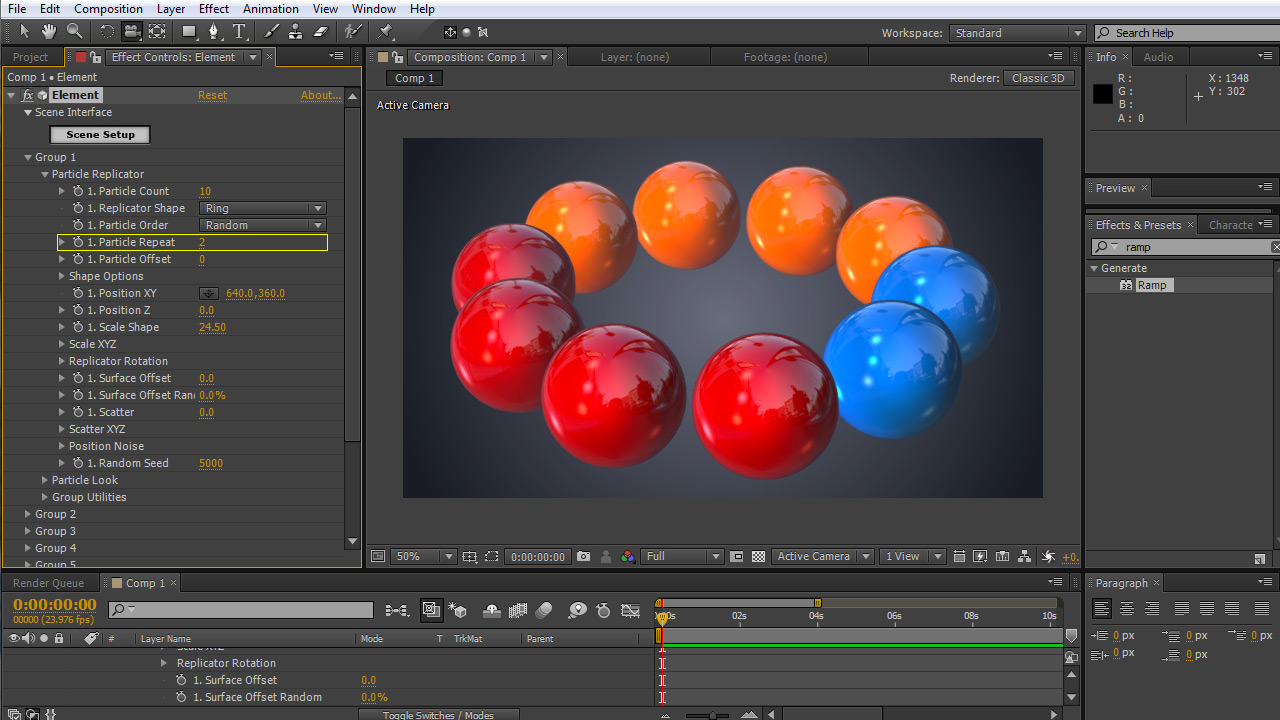
How many times each particle appears in a sequence.

<figure><img src="https://2307539615-files.gitbook.io/~/files/v0/b/gitbook-x-prod.appspot.com/o/spaces%2FVXPIT6wWK7VeTYMAHNYe%2Fuploads%2FknjJq1wnokEaoRwmR3Hc%2FParticle-Repeat.jpg?alt=media&#x26;token=ae4eef42-2054-4169-8640-ae1041db74c5" alt=""><figcaption></figcaption></figure>

***

#### Particle Offset

Shifts the sequence forward or backward.

<figure><img src="https://2307539615-files.gitbook.io/~/files/v0/b/gitbook-x-prod.appspot.com/o/spaces%2FVXPIT6wWK7VeTYMAHNYe%2Fuploads%2Fc56ZV3XUBZzQx5Q35s9K%2FParticle-offset.jpg?alt=media&#x26;token=5c4d11d3-c536-45be-9489-774b8f8c41e1" alt=""><figcaption></figcaption></figure>

***

#### Particle Replicator Options

<figure><img src="https://2307539615-files.gitbook.io/~/files/v0/b/gitbook-x-prod.appspot.com/o/spaces%2FVXPIT6wWK7VeTYMAHNYe%2Fuploads%2Fp0Vu1uI4cFtagOVT8PPV%2FParticle-Replicator-Options.jpg?alt=media&#x26;token=12e75942-8b46-4d62-8fe1-94644be1d96e" alt=""><figcaption></figcaption></figure>

#### Position XY and Z:&#x20;

Move the object in 3D space with these controls.

<div align="left"><figure><img src="https://2307539615-files.gitbook.io/~/files/v0/b/gitbook-x-prod.appspot.com/o/spaces%2FVXPIT6wWK7VeTYMAHNYe%2Fuploads%2FiWkC78a4CmpWgZYUKlpp%2FPosition-XY-and-Z-Thumb.jpg?alt=media&#x26;token=2664550c-43ef-4cf3-8cf5-502646e61767" alt=""><figcaption></figcaption></figure></div>

{% hint style="info" %}
You can use the Create Null option under Group Utilities to make it easier to move objects in space.
{% endhint %}

#### Rotation:&#x20;

Control rotation of the whole Replicator Shape.

<div align="left"><figure><img src="https://2307539615-files.gitbook.io/~/files/v0/b/gitbook-x-prod.appspot.com/o/spaces%2FVXPIT6wWK7VeTYMAHNYe%2Fuploads%2FS3PCmWH7KXq54A33RaKZ%2Frotation.jpg?alt=media&#x26;token=3f8c3b59-39af-4578-9947-7c0a2ff2c519" alt=""><figcaption></figcaption></figure></div>

#### Scatter:&#x20;

This will randomly disperse the particles in all directions.

<div align="left"><figure><img src="https://2307539615-files.gitbook.io/~/files/v0/b/gitbook-x-prod.appspot.com/o/spaces%2FVXPIT6wWK7VeTYMAHNYe%2Fuploads%2FT5FyGtCYDC3sbcNpveF9%2Fscatter.jpg?alt=media&#x26;token=aea70b90-f1e0-437e-987b-12cbc58fcd51" alt=""><figcaption></figcaption></figure></div>

#### Scatter XYZ:

Randomly disperse the particle on a specific axis.

<div align="left"><figure><img src="https://2307539615-files.gitbook.io/~/files/v0/b/gitbook-x-prod.appspot.com/o/spaces%2FVXPIT6wWK7VeTYMAHNYe%2Fuploads%2FI3Q2MT201BiyNFQwN1yf%2Fscatter-xyz.jpg?alt=media&#x26;token=5e5a414b-f2fc-47e6-94c0-64f94befa941" alt=""><figcaption></figcaption></figure></div>

#### Position Noise:&#x20;

Creates some additional randomization with the Evolution, Amount, and Scale options.

<div align="left"><figure><img src="https://2307539615-files.gitbook.io/~/files/v0/b/gitbook-x-prod.appspot.com/o/spaces%2FVXPIT6wWK7VeTYMAHNYe%2Fuploads%2FM5GpMERtitnOzV9DicbF%2Fposition-noise.jpg?alt=media&#x26;token=17847859-c305-4773-ac65-f20ddb8d476b" alt=""><figcaption></figcaption></figure></div>

#### Random Seed:&#x20;

Creates a new randomly generated scenario.

<div align="left"><figure><img src="https://2307539615-files.gitbook.io/~/files/v0/b/gitbook-x-prod.appspot.com/o/spaces%2FVXPIT6wWK7VeTYMAHNYe%2Fuploads%2FQG8C0Ao2G02di0aka2Lm%2FRandom-Seed.jpg?alt=media&#x26;token=3d4329c7-7d9e-44fb-b2ac-d02eb00e5a92" alt=""><figcaption></figcaption></figure></div>